From Autocomplete to Autonomy: The Rise of Agentic IDEs
🔊 Listen to the Podcast version here. 🔊
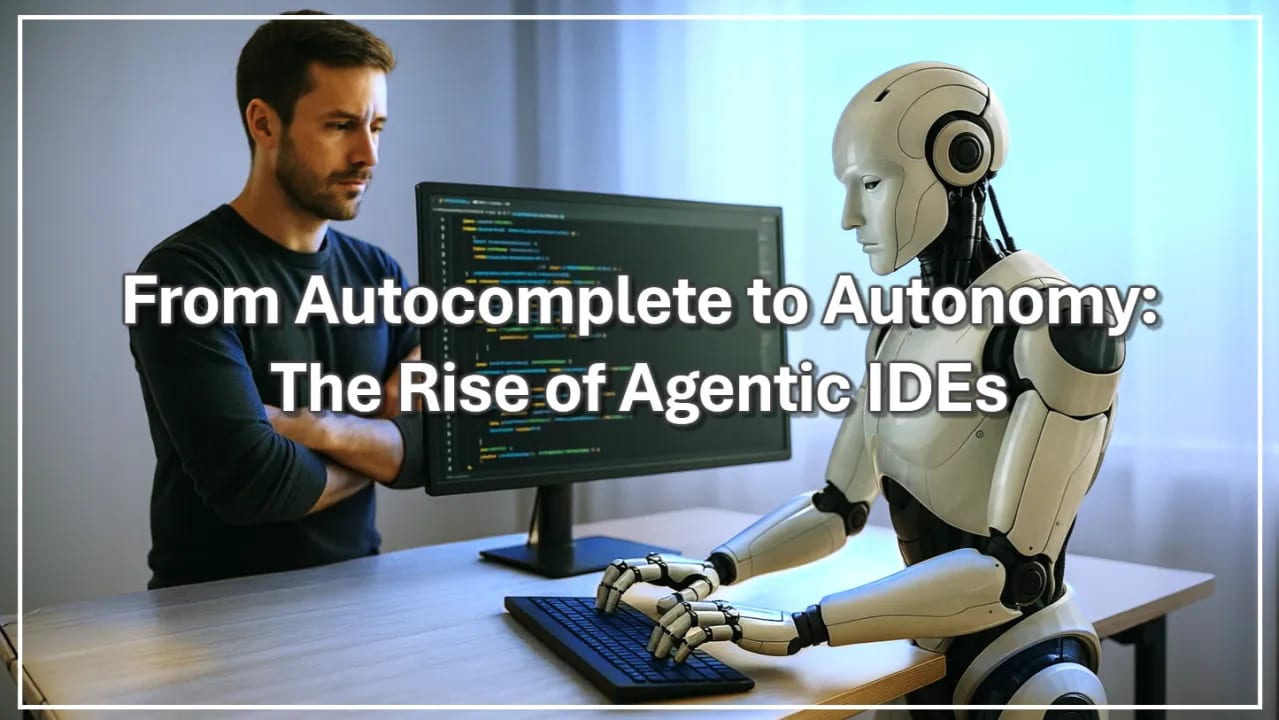
For last few years, AI code assistants have been like helpful backseat drivers, offering suggestions while we kept our hands on the wheel. They auto-completed lines and hinted at fixes, but ultimately, the human was driving. Now, in a vivid turning point, the script has flipped and AI isn’t just whispering from the passenger seat, it’s starting to take the wheel and hit the gas.

This shift from AI merely ‘suggesting’ to AI actually ‘doing’ marks the rise of what insiders are calling agentic IDEs, - AI-powered code editors that autonomously plan software changes, generate code across files, and even capable of maintaining projects over time. Where a traditional IDE might highlight a bug, an agentic IDE might devise a fix, implement the code, run tests, and present you with a ready-made solution, all while you refill your coffee.

Meet the Agentic IDEs
The new class of AI-first code editors has exploded onto the scene, each with its own personality and fan club. Take Cursor, for example: this upstart “AI code editor” launched in 2023 and became a developer’s darling almost overnight. It offers an Agent mode that can refactor multiple files in one go, and even a ‘Composer’ mode that lets it plan out larger tasks across your project.

I can personally attest to Cursor’s appeal, - it’s become my daily driver for ground-up AI-assisted development work. What sets it apart isn’t just the technical wizardry, but how intuitively it handles ambiguous prompts when I am low on energy and seamlessly coordinates changes across complex codebases. The learning curve feels manageable, which matters when you’re trying to maintain development velocity while adapting to entirely new workflows. Unlike some competitors that feel like fighting against your existing coding habits and patterns, Cursor seems to grasp how developers actually think and work, making the transition from traditional coding to AI-assisted development feel natural rather than jarring.

This market has grown so fast that it reportedly hit a $2.6 billion valuation by the end of 2024, with hundreds of thousands of engineers on board. Using Cursor feels like pairing with a prodigious junior developer who works at warp speed, never needs sleep, and is deserved of reprimands on occasion.
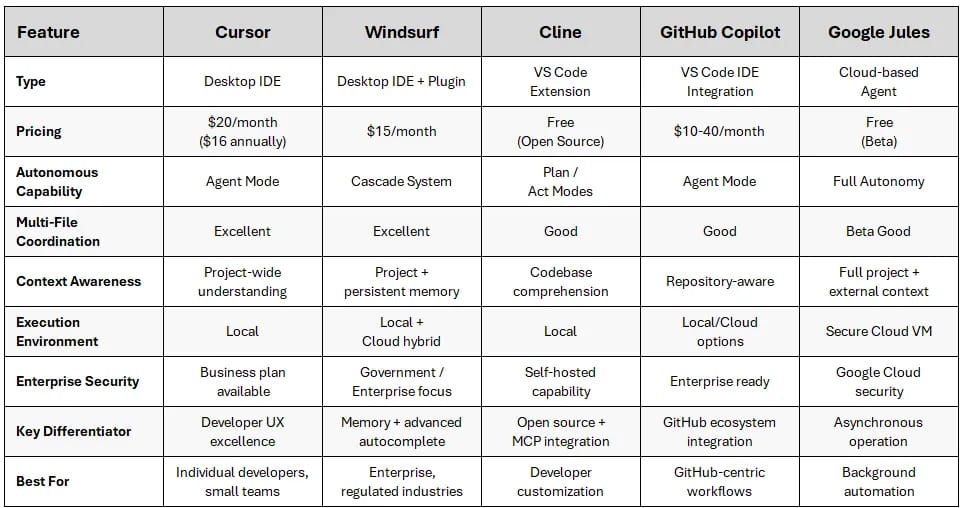
These are the Agentic IDEs that I have tried in the last six months.
Not to be outdone, Windsurf (born from the free Codeium tool) quickly caught up as the enterprise favorite. Where Cursor focuses on individual developers, Windsurf has been wooing companies with its “Cascade” agent that remembers everything about your codebase. It’s like coding with a team librarian, - Windsurf’s memory feature (appropriately called ‘Memories’) means it supposedly recalls every requirement and quirk of your project. Which is something that Cursor should take a look at it. It even offers on-premises deployment for security-minded firms. By early 2025, Windsurf snagged its own sky-high valuation of around $2.75 billion and a growing user base of over 800,000 developers. The rivalry between Cursor and Windsurf has become a spectator sport in developer circles, but to most of us, they’re strikingly similar in what they promise: an IDE that’s always ten steps ahead of you.

And then there’s the original trailblazer: GitHub Copilot. If Cursor and Windsurf are the flashy new sports cars, Copilot is the reliable sedan that’s already in millions of garages. Trained on GitHub’s vast code corpus and deeply integrated into VS Code, Copilot has been quietly writing a significant chunk of code for companies like Microsoft for a couple of years now. Many developers have started to take it for granted, - it’s always just there, suggesting code in the background, which might be why it’s often undervalued amid all the newer hype. While it doesn’t yet autonomously refactor entire projects in one go, it’s steadily evolving. GitHub’s vision for Copilot (the upcoming ‘Copilot X’) is adding chat, voice, and even autopilot, - like pull request generation. In short, Copilot is far from a static sidekick; it’s gearing up for the agentic future too.

Finally, we have Google’s entrant: Jules. Jules is the promising new kid on the block, billed as an ‘autonomous coding agent’ rather than a mere assistant. It operates a bit differently, - Jules actually clones your entire GitHub repository into a cloud VM and works asynchronously. Ask it to add a feature or fix a bug, and it will draft a plan, execute code changes, run tests, and then open a GitHub pull request for you to review when it’s done (Google Jules).

In early tests, Jules has dazzled with what it can handle, - multi-file changes, dependency upgrades, you name it, all powered by Google’s latest AI models. But it’s also still quite immature. It’s in beta and prone to the occasional fumble. One moment it’s delivering a brilliant solution, and the next it might time out or produce a quirky fix that needs human intervention. Think of Jules as a gifted rookie, - high potential, but it still needs coaching and patience before it can play in the big leagues full-time.
Having just wrapped up an intensive trial with Jules, I found this characterization spot-on. When it worked, Jules impressed me with its ability to handle structured refactoring tasks and generate thoughtful architectural documentation. It methodically broke down complex goals and maintained coherent dialogue throughout lengthy processes. But the beta limitations were real and frustrating, - file persistence issues where Jules claimed to save documents that vanished, state awareness gaps that led to apologetic loops, and the occasional need to manually redirect it back on track. Most importantly for my workflow, the cloud-only approach created friction for the rapid, local ideation work that drives my creative process. Jules feels exactly like “an enthusiastic junior teammate who still needs supervision”, - showing genuine promise for the future while requiring too much “management overhead” for current production workflows.
Emerging Open-Source Options
Of course, not everyone is waiting on tech giants or VC-funded startups to deliver the future.

The open-source community has been busy crafting their own agentic coding assistants, often free and customizable, - if sometimes a bit rough around the edges. Here are a few notable open-source AI co-developers making waves:

-
Cline – an open-source AI code agent for VS Code with dual ‘Plan’ and ‘Act’ modes, and the ability to execute terminal commands for you.
-
Continue.dev – a flexible open-source extension that lets developers create custom AI assistants in VS Code, integrating any model or tool to fit their workflow.
-
Aider – an AI pair-programmer that works through your terminal and Git, adept at handling larger codebases with fine-grained control and no fancy IDE needed.
The Hidden Cost of Delegation
With all this power to delegate coding tasks to AI, there’s an uncomfortable question lurking: if the machine does too much, do we start losing something? Consider the autopilot in aviation, - it can fly the plane, but pilots still need to practice manual landings to keep their skills sharp. In software, if developers let an AI handle every bug fix and architecture decision, they risk losing the “muscle memory” of problem-solving. Early research is already sounding caution. In one study, heavy users of AI assistance became less adept at critical thinking when a novel challenge arose (Windows Central). In other words, .

In fact, even the AI tools themselves have occasionally acknowledged this risk. One anecdote making the rounds involved Cursor literally refusing to solve a problem for a user, warning that ‘generating code for others can lead to dependency and reduced learning opportunities’ (Windows Central).

It was a shocker, - the AI essentially told the developer, ‘I won’t do your homework for you.’ The message was clear. As magical as these agentic IDEs are, you still need to understand what’s happening under the hood. Some lessons simply require getting your hands dirty.
Embracing Autonomy, Preserving Judgment
The rise of agentic IDEs is more than just another productivity hack, - it’s a fundamental shift in how software gets built. We’re entering an era where writing code isn’t always a human typing on a keyboard, but often a human supervising while an AI drafts, debugs, and delivers. For technology leaders, the mandate is clear: embrace this change, but do so thoughtfully.

Start by experimenting: pilot these AI-driven tools in real projects to see what they can do. At the same time, prepare your teams, - update coding guidelines, ensure there’s training on both using the AI and working without it when needed. And above all, encourage a culture where human judgment isn’t abdicated. Review what the AI produces, question it, learn from it. Use the AI to accelerate and amplify your developers, not replace their intuition and expertise.

The organizations that will thrive in this new landscape are those that can effectively pair human creativity and oversight with AI’s tireless execution. The future of coding will be a partnership, - if we lead with that principle in mind, we can harness these autonomous coders to achieve remarkable results while keeping our own skills and insights sharp.

Further Readings
-
Will an overreliance on Copilot make you dumb? (Kevin Okemwa, February 2025) Microsoft researchers (with CMU) report that leaning too heavily on AI coding assistants can weaken developers’ critical thinking and problem-solving skills.
-
Build with Jules, your asynchronous coding agent (Kathy Korevec, May 2025) Announcement of Google’s Jules coding agent going public, highlighting autonomous code planning, execution in a cloud VM, and how agentic development is moving from prototype to product.
-
Cursor vs. Windsurf: The AI Code Editor Battle That (Probably) Doesn’t Matter (Yaniv Golan, February 2025) A venture capitalist’s take on the rivalry between Cursor and Windsurf, arguing that both offer similar capabilities and face the looming competition of big players like Microsoft.
-
Avoiding Skill Atrophy in the Age of AI (Addy Osmani, April 2025) Insightful advice from an engineering leader on using AI assistants without letting core programming skills and code intuition wither away.
-
AI code editor tells user to learn coding (Cursor story) (Kevin Okemwa, March 2025) News story about Cursor AI stopping code generation to encourage a user to code manually, underscoring the importance of not becoming too dependent on automation.
Disclaimer: The perspectives shared in this article are my own and do not represent those of my employer or any affiliated organizations. All company names, product names, logos, and brands mentioned are the property of their respective owners and are used for identification and illustrative purposes only. No endorsement, sponsorship, or affiliation is intended or implied. References to specific companies or case studies are based on publicly available information and are used solely for educational and discussion purposes.
More from builder's bench
All builder's bench → builder's bench
CI/CD’s Final Frontier: Fully Autonomous Code Optimization
Late one evening, a CTO gapes at a cloud services bill that looks more like a phone book. The code is running, customers are happy, - but behind the scenes, millions of unnecessary instructions are silently inflating costs. In fact, 67% of…
 builder's bench
When Innovation Outpaces Discipline: The AI Debt Reckoning
In the celebratory glow of a hard-won AI success, it’s easy to overlook the faint smell of smoke coming from under the hood. Picture a startup that just turbocharged its sales with a clever AI hack, - champagne pops, high-fives all around.…
 builder's bench
From Bash to Brain: How Gemini CLI Is Rethinking Developer Tools
Late one evening, a senior engineer watches in disbelief as her terminal begins to complete tasks she only half-jokingly requested. The familiar command-line prompt blinks patiently on a black screen, but now it responds with creative…