12 AI IDEs, 5 Policy Tests, 1 Guide for CTOs

🔊 Listen to the Podcast version here. 🔊
Picture a stressed CTO in a late-night code review, a virtual genie perched on her shoulder offering brilliant fixes and a joke or two. Tempting, right? But like any good genie, an AI coding assistant can grant wishes with a catch. The allure of tools like Google’s new Gemini or Replit’s Ghostwriter is undeniable, - they promise to turbocharge your developers and whisper bug fixes at 3 AM. Indeed, some early adopters report these tools cut delivery times by up to 55% (Adnan Masood, PhD.) and boost developer morale. Yet as seasoned tech leaders know, every magic trick demands scrutiny. Before you invite an AI pair programmer into your team, you need to grill it with five unsparing questions that separate the reliable wizards from the risky tricksters.

Our fictional CTO doesn’t just accept the genie’s gifts without reading the fine print. She’s learned to ask five core questions. (1) Does the tool respect our sensitive data, or does it hoard code like a dragon hoards gold? (2) Who actually owns the code it suggests – and could using it land us in legal hot water? If the AI writes a bug that crashes production, (3) who gets left holding the bag? (4) Can we trust its security, or should we cage this genie on-premises where we can watch it? And finally, (5) does it come with a built-in moral compass (content filters and usage policies), or will it happily help create a digital Frankenstein if asked? These five concerns have emerged as pillars of due diligence for AI coding copilots. In the rest of this article, we’ll unpack each one with a heap of caution.

Data Privacy & Retention: Does Your Code Stay in the Vault?
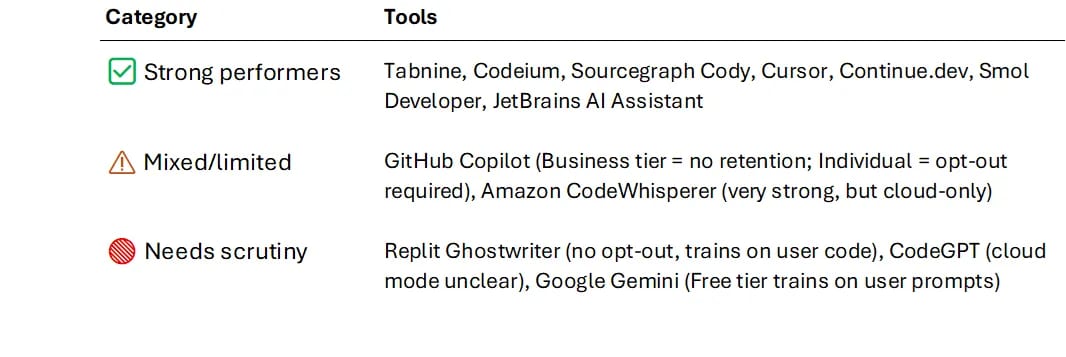
In a world where a single paste into ChatGPT can become tomorrow’s data breach headline, privacy is non-negotiable. AI IDEs differ wildly here. Some transmit every keystroke to the cloud, while others let you keep everything on your own turf. Sourcegraph’s Cody, for instance, offers on-premises deployments with robust security so your code never leaves your network (Zen Coder). Tabnine goes further, boasting zero data retention, - it refuses to store or reuse your code, treating each query like a mayfly that dies right after it’s answered. On the flip side, using something like Replit Ghostwriter means entrusting a cloud platform with your crown-jewel source code. Replit’s model is cloud-first, - that is, your code lives on their servers and their AI learns from it within that environment per their terms of service. It’s no surprise many companies lose sleep over this arrangement. Even Google’s enticing free Gemini assistant runs on Google’s servers with “shared” LLM instances behind the scenes, - in other words, your data mingles in a multi-tenant model. The most transparent players let you peek under the hood or run the engine in-house, - a strong plus for privacy hawks. If an AI tool can’t clearly answer “What happens to my data?” or “Can I self-host you?”, consider that a red flag flapping in the server room.

Intellectual Property & Licensing: Who Owns the Magic?
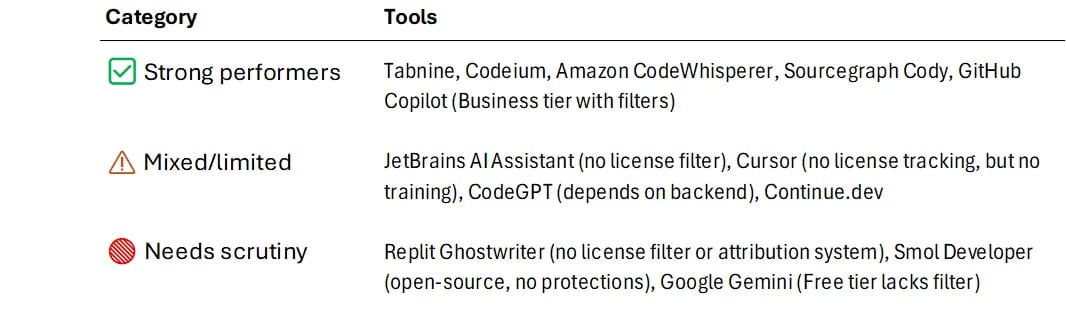
For any code genie, the second wish is “don’t get me sued.” So who owns the spells it casts, and are they original? Most AI tool providers now insist you own the code they generate, - they don’t claim copyright over your outputs (Sergei Tokmakov, EsqQ.). Great, except that doesn’t help if the AI unknowingly copied someone else’s copyrighted code into your project. This “license bleed” is a real gremlin! Even an executive-level analysis noted that licensing issues remain a top challenge with AI-generated code. We’ve seen lawsuits erupt over AI models regurgitating open-source code or other content without attribution. The infamous GitHub Copilot case was a wake-up call. In response, vendors have started adding safeguards. Tabnine, for one, touts built-in license compliance checks to prevent sneaky GPL or MIT snippets from slipping in. And Microsoft now offers to indemnify Copilot for Business users against copyright claims, - essentially saying, “if our AI inserts illegal code and you get sued, we’ll cover it” (Runtime News). However, read the fine print since those promises only hold if you use the tool exactly as directed, with all the filters on, and even then there are plenty of caveats. In short, a transparent tool should actively help you avoid IP traps or at least pick up the tab when it fails, whereas an opaque one might leave you holding the lawsuit.

Liability & Indemnification: Who Pays When the Magic Backfires?
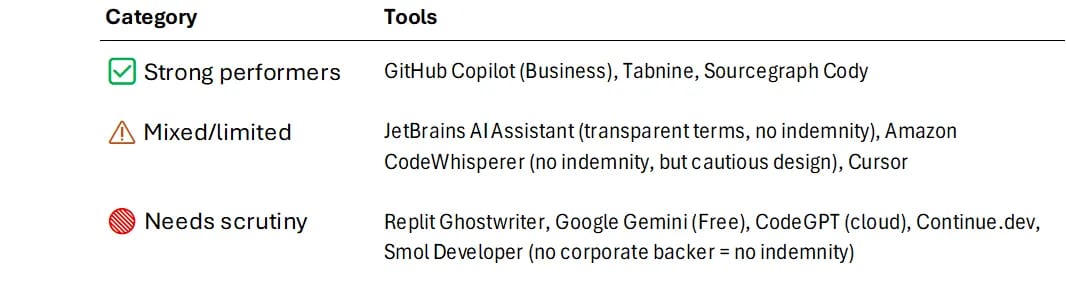
If an AI assistant writes a bug that brings down your app, can you blame the tool? Not likely. Nearly every service’s terms ensure they have minimal liability if their suggestions go awry, - GitHub Copilot’s terms, for instance, limit liability to just $500 and explicitly avoid any obligation to defend you (GitHub). In practice, that means if your AI pair programmer writes a security hole that ships to production, you’re on the hook for the fallout. And unfortunately, that scenario isn’t far-fetched. Studies show a significant chunk of AI-generated code comes with security vulnerabilities, - one analysis found roughly one-third of suggestions had bugs or flaws that could be exploited. Even more worrying, developers tend to become overconfident in AI-supplied code. A Stanford study revealed that relying on AI assistants often led to more insecure code overall, all while making devs more sure of its quality (Secure Code Warrior). The liability here is twofold: legal and technical. Legally, if something breaks or exposes data, you can’t haul the AI into court, - you might instead face tough questions or lawsuits, about your own oversight. Technically, a toxic code suggestion can cost thousands in downtime and cleanup. Some vendors do offer narrow indemnities (mostly for copyright issues, as discussed above), but none are saying “we’ll pay your fines if our AI writes a security bug.” The best practice is to treat the AI as a junior developer who writes speedy but unchecked drafts. You still need rigorous code review, testing, and maybe extra security scans (SAST, anyone?) to catch issues. An AI partner that acknowledges its fallibility, - perhaps by providing warnings or transparency about uncertainty, is far more trustworthy than one that acts like it’s magically infallible.

Security & Self-Hosting: Keep the Genie in Your Bottle
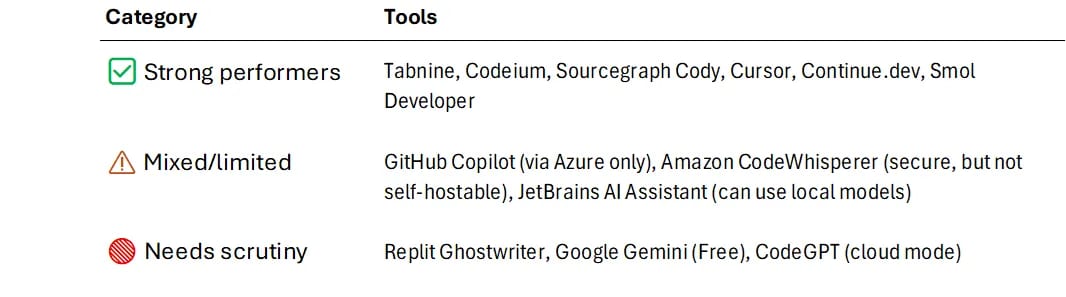
Even the most helpful AI assistant can become a security risk if it’s not kept on a tight leash. For many organizations, that means self-hosting the AI or deploying it within their own secure cloud to maintain full control. Think of it as keeping the genie in your own bottle instead of letting it roam in someone else’s cloud palace. Tools like Sourcegraph Cody understand this. They allow on-premises setups and emphasize enterprise security features. Similarly, Tabnine gives teams the option to run models locally or even train on their proprietary codebase behind the firewall (Th!nk Evolve Consulting). This is a godsend for finance, healthcare, and government teams that simply cannot send code to a third-party cloud. On the other hand, offerings like Replit Ghostwriter or Google’s free Gemini are cloud-bound, - you have to use them in their environment or via internet API. Google at least lets enterprise customers corral Gemini within a secure perimeter using VPC boundaries and encryption, but it’s still not the same as having the model on your own hardware. For the ultra-cautious, fully open-source assistants like Tabby or DeepSeek Coder even allow on-prem deployment with code you can inspect line by line, providing the ultimate transparency (Th!nk Evolve Consulting). Of course, with great power comes great responsibility. Running your own AI means handling updates, model tuning, and security hardening yourself. But for many CTOs, that trade-off is well worth the peace of mind. A transparent solution will offer self-hosting or at least clear controls to wall it off, whereas an opaque one might just say “trust us, it’s secure” without giving you the tools to verify.

Acceptable Use & Content Controls: The Genie’s Rulebook
Every AI coding tool comes with a rulebook, - both for the user and for the AI itself. Under the hood, most top platforms employ layers of content filtering and guardrails to prevent their generative genie from producing truly nasty or dangerous output… or proprietary secrets. Microsoft, for example, uses classifiers and “metaprompts” to align Copilot with its responsible AI principles, - essentially checking your prompts and the AI’s answers against forbidden categories before you ever see a suggestion. In plain English, ask your AI assistant to write malware or spew hate speech, and it will either refuse or produce a heavily sanitized response. These acceptable-use rules are important. They keep the AI from becoming a compliance nightmare. But they can also be a double-edged sword. On one hand, you don’t want an AI that will cheerfully write ransomware or biased code. No one needs an “evil Clippy”.

On the other hand, overly aggressive filters can hinder normal work, - developers have reported AIs refusing code that was actually benign, simply because it tripped some hidden keyword filter. The big issue is transparency. Vendors rarely divulge exactly how their filters work or what triggers a block, which can frustrate teams when they hit a mysterious “Sorry, I can’t help with that” message. And if you try to turn these filters off? Good luck, - those safety checks aren’t optional toggles. You’d have to deliberately hack around them which would likely violate the terms of service. A user-centric AI tool will be upfront about its limitations, - maybe even allow some customization of content controls or at least inform you when something was filtered out and why. If a tool is more secretive than a magician about its guardrails, you have to ask: is it protecting the user, or just covering its own tail?

5 Policy Tests Across 12 Tools
1. 🛡️ Data Privacy & Retention
Does the tool store, retain, or train on your code? Can you opt out or self-host?
2. 📜 Intellectual Property & Licensing
Do you own the code? Does it avoid license violations?
3. ⚖️ Liability & Indemnification
Will the vendor back you legally if something goes wrong?
4. 🏰 Security & Self-Hosting Options
Can you self-host? Is it compliant (SOC2, GDPR, et cetera)?
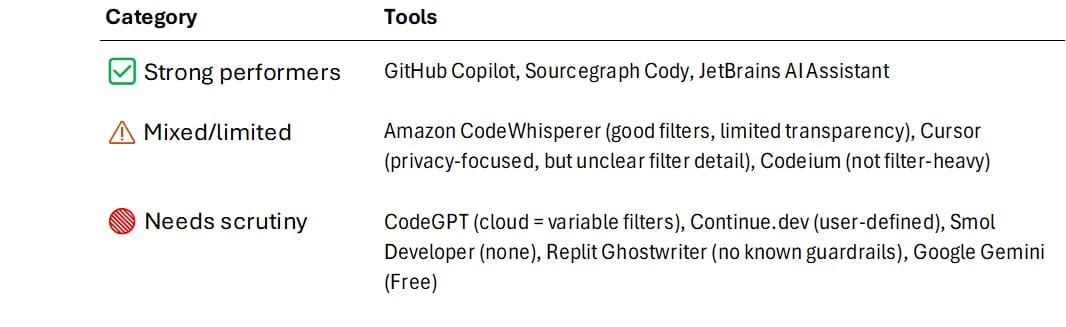
5. 📏 Acceptable Use & Guardrails
Does it prevent dangerous output? Are safety filters transparent or adjustable?
Choose Your AI Wisely
Before you invite an AI assistant into your stack, this isn’t just a checklist, - it’s a character test. The policy matrix above reveals more than legal clauses or tech specs. It shows which tools treat you as a partner, and which quietly treat your code as fodder. Some vendors have earned trust through transparency and control. Others still rely on obfuscation, defaults, or wishful assumptions. If you’re serious about privacy, IP safety, and long-term risk posture, the difference between “good enough” and “governance-ready” becomes stark. Now that the scoreboard’s clear, the choice is yours.

In the end, you hold the lamp. By asking these five hard questions and demanding straight answers, you ensure the genie you let into your IDE is a true ally and not a troublemaker. AI coding tools can be transformative, but only when you, - the human in charge, set the ground rules. So go ahead and embrace the magic, just keep your eyes open and your wishes wise.

Further Readings
-
Inside the AI IDE Boom — How Cursor, Copilot, and Replit Are Redefining the Craft of Code (Adnan Masood, May 2025) In-depth exploration of AI-assisted coding tools’ benefits and risks, highlighting productivity gains and the need for privacy and policy guardrails.
-
Two takes on the future of software development (Tom Krazit, June 2025) Newsletter coverage of expert perspectives on how generative AI is reshaping software development and the tricky balance between adopting AI and maintaining developer productivity metrics.
-
Gemini CLI: your open-source AI agent (Taylor Mullen, June 2025) Google’s official announcement of the Gemini Code Assist CLI tool, highlighting its free availability, open-source approach, and integration of Gemini AI into developers’ terminals.
-
9 GitHub Copilot Alternatives for Effective Coding in 2025 (Sergio, May 2025) A comparative roundup of AI coding assistants (Tabnine, Sourcegraph Cody, CodeWhisperer, etc.), focusing on features like privacy controls, self-hosting options, and pricing for development teams.
Disclaimer: The perspectives shared in this article are my own and do not represent those of my employer or any affiliated organizations. All company names, product names, logos, and brands mentioned are the property of their respective owners and are used for identification and illustrative purposes only. No endorsement, sponsorship, or affiliation is intended or implied. References to specific companies or case studies are based on publicly available information and are used solely for educational and discussion purposes.
More from builder's bench
All builder's bench → builder's bench
Rapid Code, Rapid Decay: How AI Tools May Repeat 90s RAD Mistakes
Picture this... It's 1995 and an ambitious accountant just built a mission-critical application using Microsoft Access. It works like a charm, - until it doesn't. Fast forward to 2025 and instead of rogue office workers building shaky…
 builder's bench
BlackBoxToBlueprint: Software Archaeology Meets AI
In a sleek, climate-controlled data center lined with racks of modern servers, it’s easy to assume everything is cutting-edge. But looks can be deceiving. Beneath the polished exterior, some of the world’s most critical business logic…
 builder's bench
From Bash to Brain: How Gemini CLI Is Rethinking Developer Tools
Late one evening, a senior engineer watches in disbelief as her terminal begins to complete tasks she only half-jokingly requested. The familiar command-line prompt blinks patiently on a black screen, but now it responds with creative…